

MANAGED IT SERVICES
Get IT Off Your Plate Without Losing Visibility or Control
Your business depends on technology, but that does not mean you should have to manage every support request, vendor, security decision, and system update yourself.
TotalCare gives your business one accountable IT team to support your employees, manage your systems, coordinate cybersecurity, and help you plan what comes next.
Supporting businesses since 1996 from our team in Corning, New York.
TotalCare May Be Right for Your Business If…
You should be able to lead your business without becoming the person who coordinates every ticket, technology vendor, software problem, and security decision.
TotalCare is designed for businesses that rely on technology and want one team to take broader responsibility for keeping it supported, maintained, secure, and planned.
Your employees depend on technology throughout the day
When systems or applications stop working, productivity, communication, customer service, and operations can quickly be affected.
You need more than occasional IT repairs
You want important responsibilities handled continuously, not only after something breaks.
IT responsibility is scattered
Employees, managers, software vendors, internet providers, and outside support companies may each manage a different part of the environment.
Leadership lacks a clear view of what comes next
Technology replacements, risks, projects, and expenses often appear with little warning.
Your team needs a clear support process
Employees should know where to request help and how their issue will move forward.
You want an ongoing IT relationship
You are looking for long-term management and accountability rather than pay-as-you-go repairs.
Only Need Helpdesk or Selected Remote Support?
Remote IT may provide the narrower level of coverage your business needs.
Fixing Tickets Is Not the Same as Managing IT
When an employee cannot access an application, fixing the immediate problem matters. But the cause may involve the device, account permissions, network, licensing, security settings, or an outside software vendor.
Basic Helpdesk Support
TotalCare Managed IT
TotalCare is designed to manage the environment behind the ticket, not only respond to the individual request.
TotalCare Brings Your IT Responsibilities Together
TotalCare is Micro Solutions’ comprehensive managed IT service. It combines employee support, system management, cybersecurity, backup oversight, technology administration, vendor coordination, documentation, and planning through one ongoing relationship.
After operating for years under the traditional break-fix model, Micro Solutions evolved into fully managed IT so clients could receive more consistent oversight, maintenance, security, and planning.
The Responsibilities Behind a Managed IT Environment
The exact scope of TotalCare depends on your technology environment and service agreement. In general, TotalCare brings the following responsibilities into one managed relationship.
Employee Support
Give covered employees a clear way to request help with everyday technology issues.
- Helpdesk access
- Troubleshooting
- User guidance
- Request prioritization
- Escalation to the appropriate technical resource
- Coordination when another vendor is involved
Devices and Infrastructure
Maintain visibility into the systems your employees and business operations depend on.
- Workstation and server monitoring
- Patch management
- System maintenance
- Device health
- Network oversight
- Technical alert review
- Lifecycle visibility
Microsoft 365 and User Administration
Manage routine accounts, access, licensing, and Microsoft cloud responsibilities included in the agreement.
- User account administration
- Access changes
- License administration
- Microsoft 365 support
- Identity configuration
- Device and application administration
Cybersecurity Management
Coordinate security with the people, devices, accounts, and systems it is intended to protect.
- Endpoint protection
- Identity and access controls
- Multifactor authentication
- Email security
- Security monitoring
- Patch and vulnerability responsibilities
- Security alert escalation
- Configuration reviews
Backup and Recovery Oversight
Maintain visibility into backups for the systems and data covered by the service agreement.
- Backup monitoring
- Coverage reviews
- Failure notification and follow-up
- Recovery planning
- Testing responsibilities
- Retention and restoration discussions
Vendor Coordination
Reduce the time your team spends coordinating several technology providers.
- Internet providers
- Software vendors
- Telecom providers
- Hardware providers
- Line-of-business application vendors
- Warranty and support contacts
Documentation
Build and maintain an organized understanding of the environment.
- Systems and devices
- Vendors
- Configurations
- Accounts
- Support procedures
- Known dependencies
- Environment history
Technology Planning
Help leadership see important technology decisions before they become emergencies.
- Lifecycle planning
- Replacement priorities
- Risk discussions
- Budget conversations
- Technology roadmaps
- Project planning
- Recurring business reviews
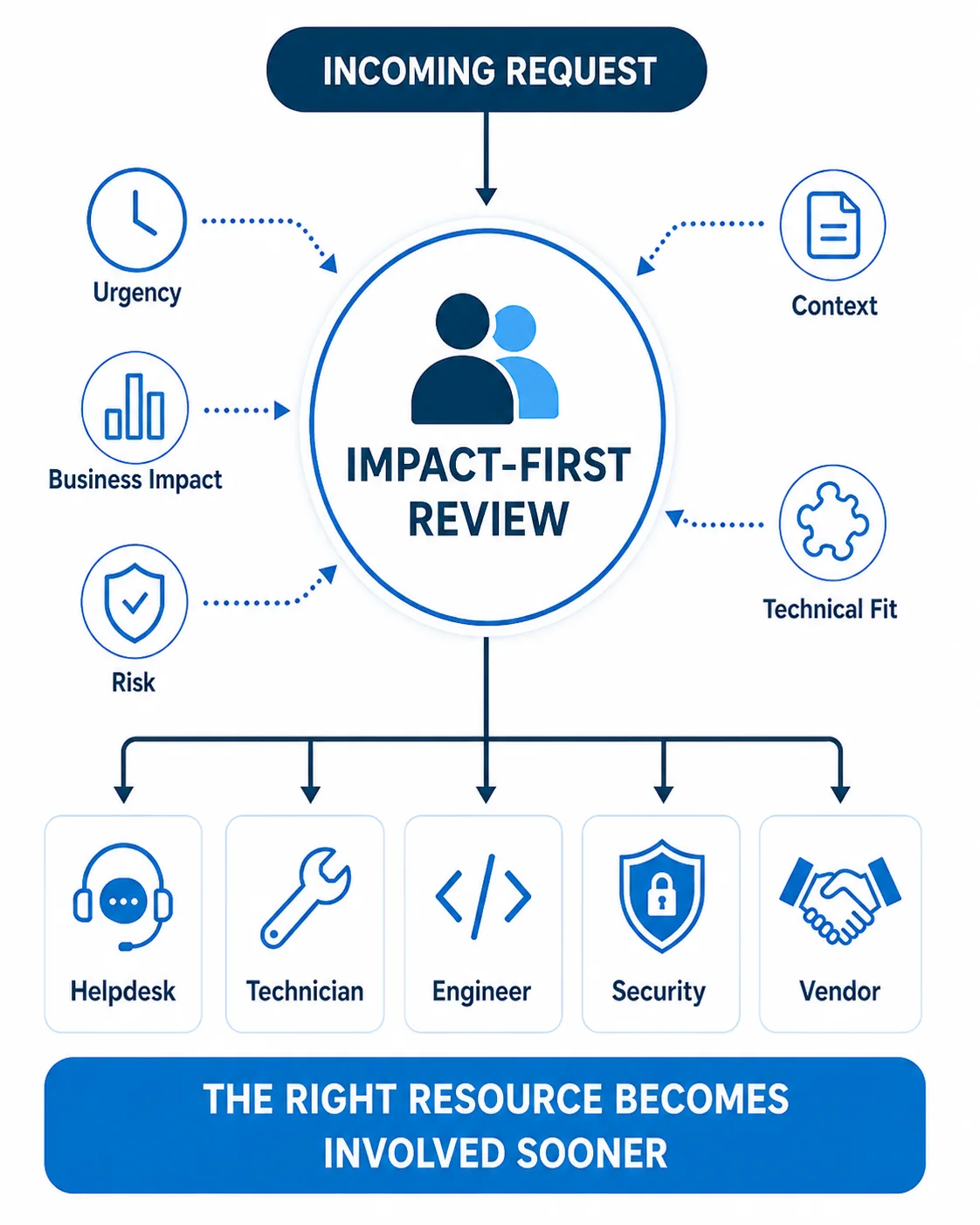
A Clear Path from Request to the Right Resource
When an employee needs help, they should not have to determine which technician, vendor, or department owns the issue.
TotalCare gives covered users a defined support process.
1. Request Help
The employee contacts the Micro Solutions helpdesk through the support channels included in the agreement.
2. Review the Issue
The request is reviewed based on:
- Urgency
- Business impact
- Security or operational risk
- Client environment context
- Technical requirements
3. Route It to the Right Resource
The issue is directed to the appropriate helpdesk technician, engineer, security resource, or outside vendor.
4. Resolve and Document
The team works the issue, records relevant information, and updates documentation when appropriate.
5. Look Beyond the Immediate Fix
Recurring issues, broader conditions, or planning needs may be identified for additional follow-up.
This process helps reduce unnecessary handoffs, repeated explanations, and confusion about who should move the issue forward.
A Structured Start to the Managed IT Relationship
Changing IT providers can feel complicated. A clear onboarding process helps establish access, documentation, responsibilities, and support procedures before ongoing management begins.
1
Understand Your Environment
Micro Solutions learns about:
- Your business operations
- Users and locations
- Systems and applications
- Current providers
- Existing concerns
- Security and backup responsibilities
- Upcoming priorities
2
Document and Stabilize
The team organizes available information, establishes support procedures, deploys approved management tools, and works through agreed onboarding priorities.
This may include:
- Administrative access
- Devices and systems
- Vendors and licenses
- Network information
- Existing documentation
- Urgent technology gaps
- Support communication procedures
3
Manage and Improve
The relationship moves into ongoing:
- Employee support
- Monitoring
- Maintenance
- Security coordination
- Vendor management
- Documentation
- Review and planning
You receive visibility into how support works, what Micro Solutions manages, and which responsibilities remain with your business or another provider.
Clear Responsibility Starts with Clear Scope
TotalCare brings broad IT responsibility into one managed relationship. It does not mean that every piece of hardware, software, licensing, project work, or specialized service is automatically included.
Before service begins, Micro Solutions documents the agreed responsibilities, covered systems, recurring services, and items that require separate approval.
Managed Through the TotalCare Agreement
Depending on the approved scope, this may include:
- Helpdesk coverage for approved users
- Monitoring and maintenance for covered systems
- Defined cybersecurity responsibilities
- Backup oversight for covered systems
- Microsoft 365 administration
- Vendor coordination
- Environment documentation
- Agreed technology planning activities
Scoped Separately When Applicable
These items may require separate pricing, approval, licensing, or project scope:
- New computers and hardware
- Software and Microsoft licenses
- Major technology projects
- Cabling or construction work
- After-hours project work
- Specialized cybersecurity licensing
- Formal compliance-management programs
- Advanced vCIO or vCISO services
- Specialized backup storage or recovery services
- Onsite work outside the agreed service area
- Unsupported or obsolete systems
Clear boundaries help your leadership understand what Micro Solutions owns, what your business owns, and what requires a separate decision.
Less Internal Coordination. More Visible Responsibility.
TotalCare is intended to make IT easier to support, coordinate, maintain, secure, and plan.
Before TotalCare
With TotalCare
With TotalCare, IT becomes a managed business function rather than another responsibility leadership has to carry.
Choose the Level of IT Responsibility You Need
TotalCare is designed for businesses that want Micro Solutions to manage the broader IT environment.
Remote IT is designed for organizations that need dependable helpdesk support or selected remote services without transferring the same level of responsibility.
Managed IT Should Reduce the Burden on Your Team
The strongest evidence of a managed IT relationship is not a list of technology products. It is what clients experience when support, planning, systems, and vendors are managed more consistently.
Industry
Museum and Cultural Organization (Nonprofit)
Service Relationship
Long-standing Totalcare client
Areas Supported
Hardware troubleshooting, network support, cybersecurity, and antivirus services
Related Technology Needs
TotalCare manages a broad IT environment, but some organizations also need deeper support in a specific area.
Cybersecurity
Learn how Micro Solutions coordinates identity, devices, access, email, monitoring, backups, and security responsibilities.
Compliance Management
Build and maintain an ongoing program for assessments, policies, tasks, evidence, reporting, and framework requirements.
vCIO and vCISO Services
Add structured technology or cybersecurity leadership for planning, budgeting, governance, reporting, and risk decisions.
Frequently Asked Questions About TotalCare
What is included in TotalCare managed IT?
TotalCare may include helpdesk support, monitoring, maintenance, cybersecurity management, backup oversight, Microsoft 365 administration, vendor coordination, documentation, and technology planning.
The exact covered users, systems, services, licenses, locations, and responsibilities are documented in the service agreement.
How is TotalCare different from Remote IT?
TotalCare is designed for businesses that want Micro Solutions to manage the broader IT environment.
Remote IT provides more targeted support, such as helpdesk access or selected remote management services, when the business does not need the same level of IT ownership.
How do our employees contact the helpdesk?
Covered employees receive approved support instructions during onboarding. These instructions explain how to submit requests, which users are covered, and how urgent or specialized issues are handled.
Does TotalCare include cybersecurity?
Cybersecurity is managed as part of the TotalCare environment. The exact tools, controls, monitoring services, and licenses depend on the approved scope.
Does TotalCare include Microsoft 365?
Microsoft 365 administration may be included in the TotalCare scope. Microsoft licenses and additional products may be priced separately depending on the agreement.
Does TotalCare include backup and disaster recovery?
TotalCare may include backup monitoring and recovery oversight for covered systems. The agreement should identify which data and systems are protected, how failures are handled, what testing is performed, and which recovery services are included or scoped separately.
Are computers, software, and technology projects included?
New hardware, software, licenses, cabling, and major projects may require separate approval and pricing. These boundaries are identified before the work begins.
Can Micro Solutions provide onsite support?
Onsite support is available within the agreed service area and service scope. The need for onsite work depends on the issue, location, and agreement.
Can TotalCare work with an internal IT employee?
TotalCare is primarily designed for businesses that want Micro Solutions to carry broader responsibility for IT.
Organizations with internal IT staff may be better suited for Remote IT or a shared support arrangement.
Does TotalCare include compliance management?
Managed IT can support the technical controls and systems involved in compliance. Formal compliance-program management, policy work, evidence organization, reporting, and framework guidance may require a separate Compliance Management service.
How is TotalCare priced?
TotalCare is structured around a recurring monthly fee based on the technology environment and agreed responsibilities.
Hardware, projects, licensing, specialized services, and other separately scoped work are identified during the proposal process.
What happens when we switch IT providers?
Micro Solutions begins by learning about your business and technology environment. The team then organizes available documentation, establishes access and support procedures, addresses agreed onboarding priorities, and moves into ongoing management.
The goal is to create a clear transition without leaving your team to coordinate every technical detail.
Find Out Whether TotalCare Is the Right Fit
Tell us how your technology is currently managed, where responsibility feels unclear, and what your team needs from an IT provider.
We will help determine whether TotalCare, Remote IT, or another service path is the better fit.
The first conversation is focused on understanding your situation and identifying a practical next step.